Search Menu Update

"The Search Menu" represents a proactive initiative I launched to elevate our search experience, recognizing its pivotal role in enhancing user engagement and facilitating intuitive navigation throughout our online store purchasing journey.

My Role

As the sole product designer, I collaborate with the Product Manager and Engineering team to enhance the FBN store's user experience. I focus on user research, design, and ensure the seamless implementation of user-friendly features, contributing to a more engaging shopping journey.

Set the Context

Our data reveals that a significant majority of our users initiate their shopping journey in our store through the search feature. Despite this trend, complaints from users and our sales team suggest the current drop-down menu is not user-friendly.

Industry

Industry

B2B

E-commerce

B2B

E-commerce

B2B

E-commerce

Scope

Scope

Update the

Search Menu Only

Update the

Search Menu Only

Update the

Search Menu Only

Timeline

Timeline

1 month

Tools

Tools

Figma

lyssna.com

Figma, Miro, Usertesting.com, Google survey

​Key Problems

  • Insufficient indicators on the search menu (search suggestions VS the product page)

  • Product availability unclear

  • Lack of alternative suggestions for unavailable products

  • Not optimized for spacing on mobile

Target Users

Primary Users:

Existing and new farmers who use the platform for their agricultural needs

Secondary Users:

Sales representatives and FBN agronomists who assist in providing advice and support to farmers

Business Objectives

  • Increase Revenue: Optimize the search experience to drive higher conversion rates and boost sales.

  • Improve Customer Retention: Enhance product availability communication to improve user satisfaction and increase customer loyalty.

  • Foster Brand Loyalty: Provide helpful alternative suggestions in the search feature to guide users and strengthen brand affinity.

  • Expand Market Reach: Enhance the user experience to attract new customers and expand the company's market presence.

Goals

  • Enhance user satisfaction by improving the clarity of indicators on the Search Menu.

  • Improve user retention by providing more accurate and visible product availability information.

  • Enhance user experience and increase conversion rates by providing helpful alternative suggestions in the search feature.

Measurements

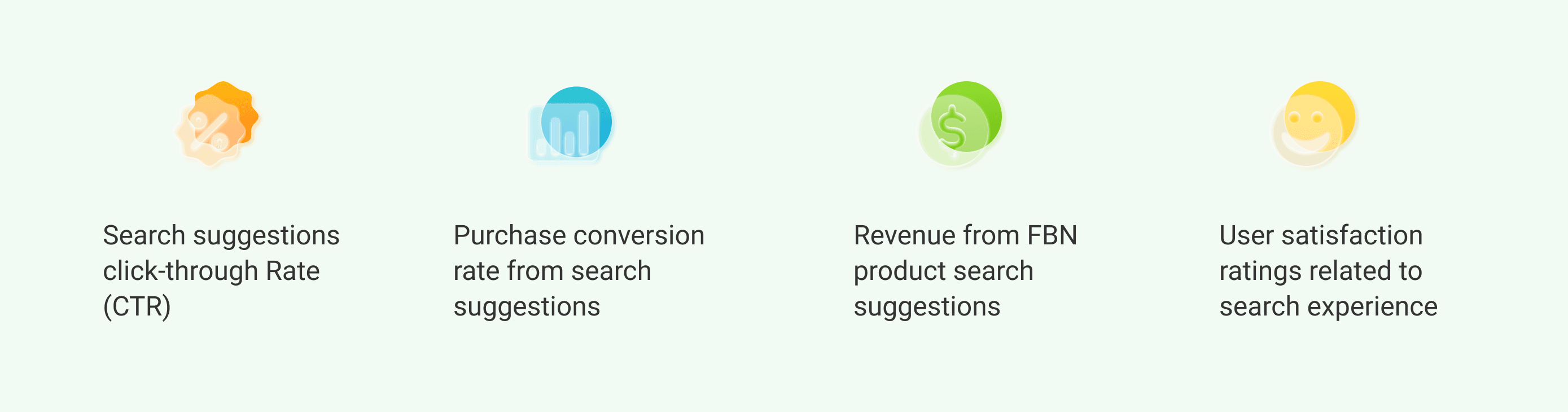
The updated search menu design received positive feedback from our stakeholders. Although it was only implemented earlier this month, we are awaiting sufficient time to gather data for the following metrics.

The Process

1. Understand

1. Understand

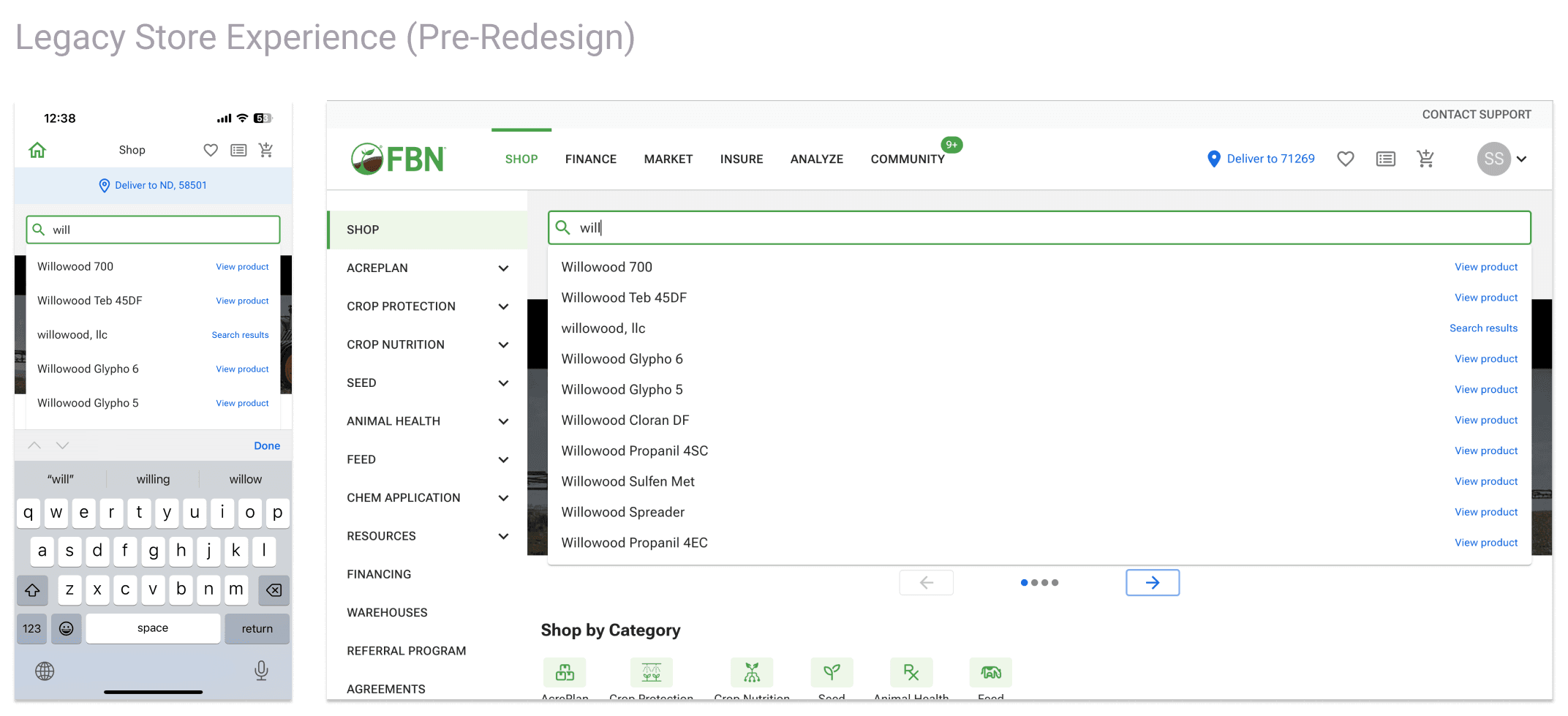
As the initial step, I conducted an audit of the existing design to identify areas for improvement and understand the workings of our current search menu algorithm.

Then, I conducted a brief comparative research session, focusing on the search suggestion menu of the leading e-commerce websites. My objective was to understand the existing design, assess its pros and cons, and identify elements that we can reference for potential improvements.

2. Define

In the discovery phase, my primary focus was on understanding the goals of our users and identifying their major pain points. After that, I identified the design constraints and solidified our design principles to guide the subsequent phases of the project.

Design Principles & Constraints

  • Prioritize mobile devices in the design.

  • Updating the search suggestions menu only.

  • Retain the coping matching mechanism for generating search suggestions.

Define Design Directions

3 Ideation | Validation

At this stage, I began addressing the identified problems one by one. I conducted multiple rounds of rapid ideation, validations, and re-ideation, along with validations, to expedite the progress of the project.

Problem 1 - Insufficient Indicators on the Search Menu

Users seek a streamlined experience distinguishing between search suggestions leading to product detail pages and those directing them to suggestion pages. The current use of case differences and indicators falls short, as it struggles to effectively communicate these distinctions. This lack of clarity, coupled with the indicators' distant placement on desktop, creates a confusing paradigm for many users.

Our Goal

Our main objective is to ensure users can easily distinguish between navigating to a product page or a search suggestion page. This improvement aims to guide users to the appropriate destination with clarity and ease.

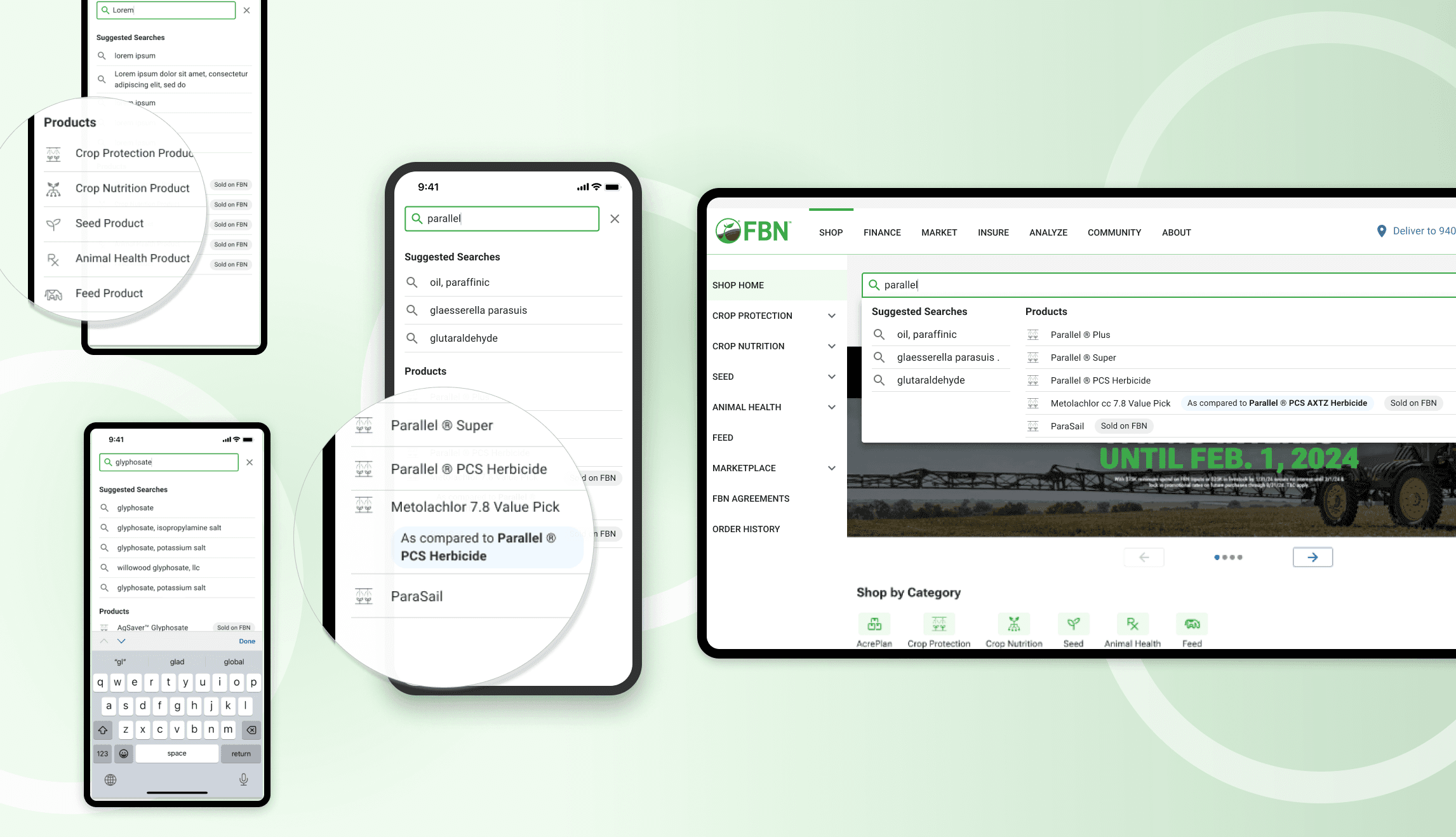
First, I explored a two-section design to aid users in quickly distinguishing between the two types of destinations. Additionally, I adhered to the Human Interaction Guidelines (HGI) to ensure that each row is no smaller than 44px in height.


Upon exploration, it's clear that options with titles and icons provide a clearer distinction between sections. While options with thumbnails offer more brand logo information, they require additional assets we can't currently support. Hence, we've opted for the titles plus icons design.

Then, I got the feedback from the stakeholders that we need to find the right icon for the product links, not only to make them more intuitve to understand also more fit into our farmers mindset.

Afterward, I explored various icons and conducted several guerrilla user preference tests.

Throughout the process, I faced challenges in finding the right icon. I made a conscious effort not to settle for an option without considering all aspects. After persistent exploration, I eventually found the ideal one.

In the first user preference test, the shopping bag icon was favored. However, after reviewing feedback, I noted concerns about users accidentally adding items to their cart by clicking it. As our goal is to encourage users to click on the product link for purchase, I explored alternative options.

In the second round of user testing, the shopping bag icon was favored. However, it became clear through stakeholder discussions that it doesn't fit our farming industry context. Therefore, I explored alternatives.

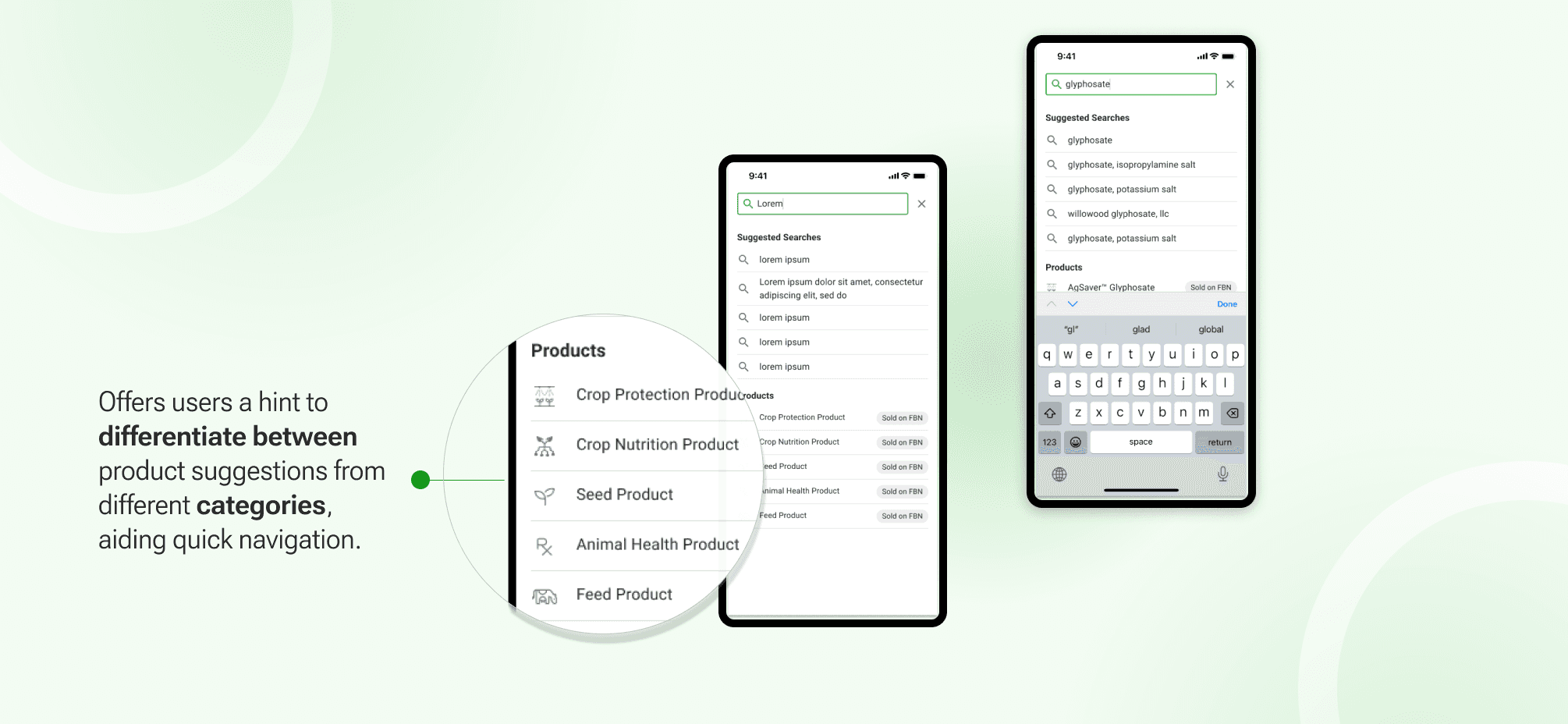
As I pondered over finding the right icon, inspiration struck from our category icons. Given their widespread use on the website, it makes sense to utilize them as product link indicators. This offers users a hint to differentiate between product suggestions from different categories, aiding quick navigation to their desired items. The positive feedback from both stakeholders and end users validates this approach

Next, I aimed to optimize the spacing for both mobile and desktop views.

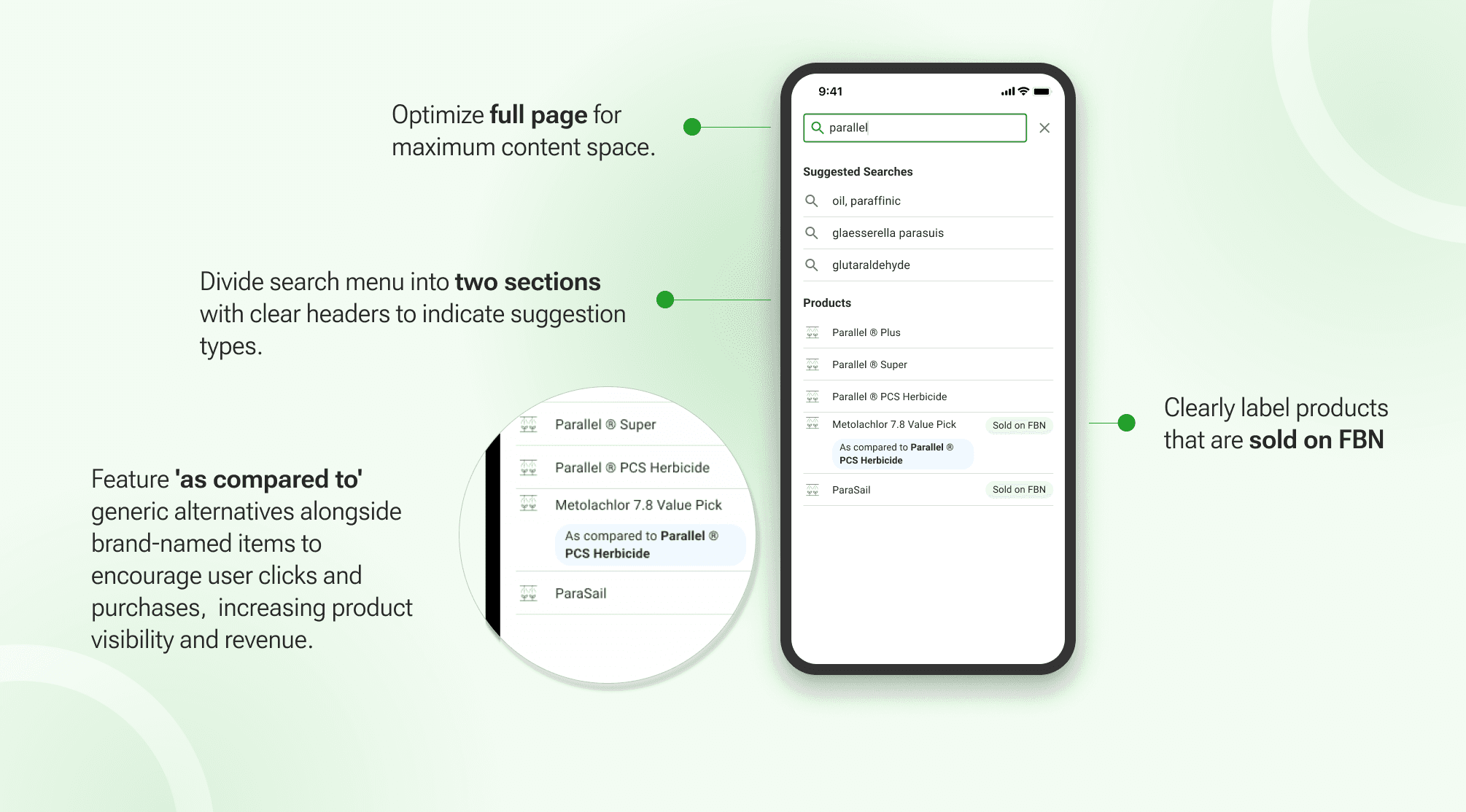
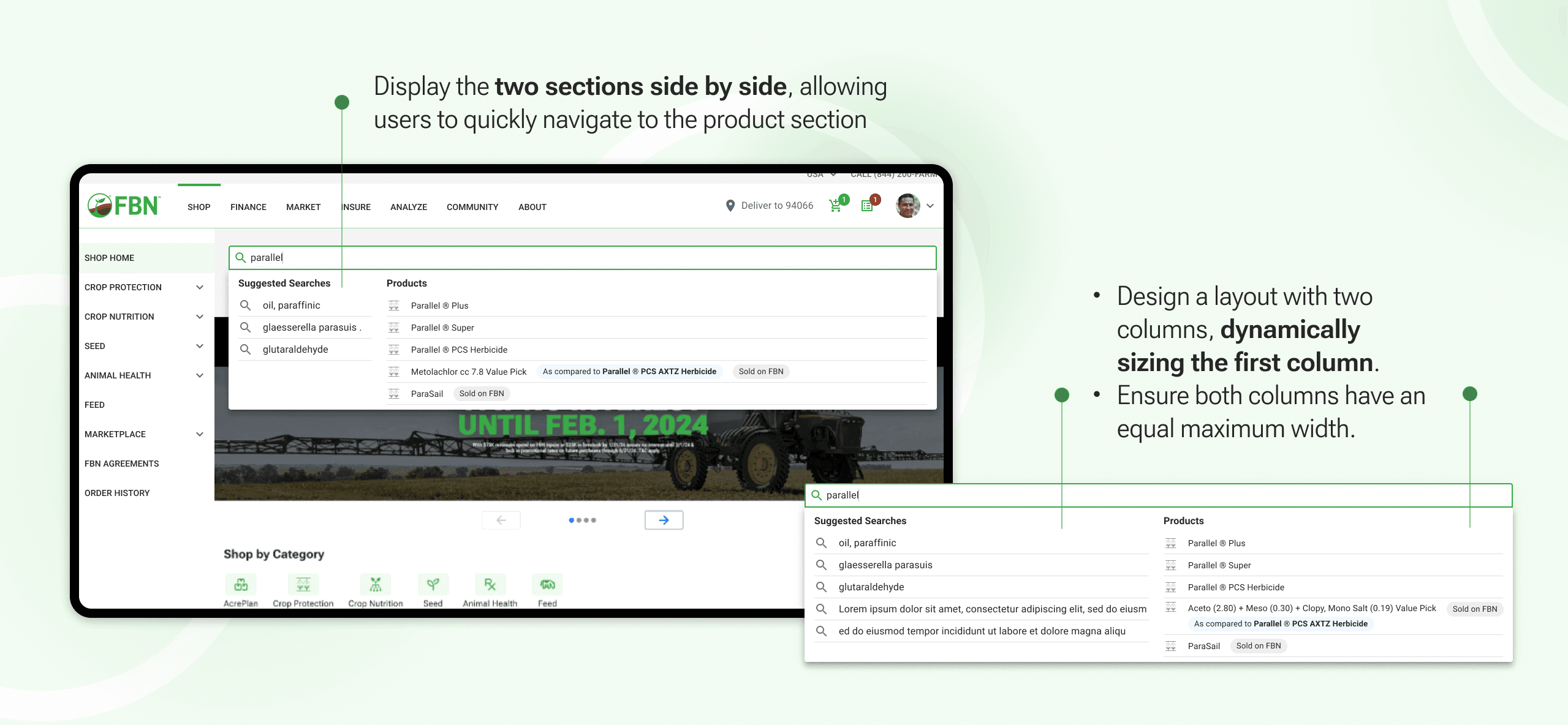
I suggested transforming the mobile drop-down design into a full-page experience to show more information above the keyboard. For the desktop view, I proposed arranging the two sections side by side to improve user navigation.

Problem 2 - Not optimized for spacing on mobile

The dropdown menu on the mobile view reduces spacing available to display search suggestions, resulting in a less user-friendly experience for mobile users. This could impact the overall usability and effectiveness of the website, as users may find it difficult to navigate or interact with the search feature.

Our Goal

Facilitate user experience by providing clear indications to set expectations regarding product availability.

Problem 3 - Product Availability Unclear

We showcase a substantial number of products on our online store page that, for various reasons, may not be available for purchase. Nevertheless, we aim to feature them in the search suggestion menu, allowing users to navigate to these pages and discover alternatives.
However, the lack of clear indicators sometimes results in users repeatedly landing on product pages that are currently unavailable, leading to a less-than-satisfactory experience.

Our Goal

Facilitate user experience by providing clear indications to set expectations regarding product availability.

We aim to help users set accurate expectations before clicking on suggested product links. While we want to avoid discouraging users from clicking on unavailable products, we also see an opportunity to guide them toward alternative available products. Throughout the design process, I maintain open communication with the engineering team to ensure technical feasibility. However, technical limitations hinder real-time display of product availability. Therefore, we've opted to showcase products sold on FBN, aligning with stakeholder feedback and insights.

Problem 4 - Lack of Alternative Suggestions

Users often search for brand-name products but want similar functional items. However, our existing search system lacks accurate content-matching capabilities and alternative suggestions for brand-name products, limiting user exploration effectively.

Our Goal

Optimize guiding users to alternative products when searching for a branded product not currently offered.

To tackle this, I explored displaying alternative products when users search for unavailable branded items. This involves presenting the primary alternative product with a clear indication of its relationship to the searched item. I quickly mocked up several iterations and tested them for usability to find the best solution.

Next: Ensure the Updated Design Accommodates Longer Product Names

Given that a number of our products and active ingredients have long names, we must ensure that the updated design maintains a user-friendly experience for these longer names.

Our Goal

Ensure readability of long names in the updated design while allowing the second section to peek out on the mobile view, providing users a hint that there is more to discover

While refining the details of my design, I initiated a round of stress testing to ensure its compatibility with long product names and active ingredients.

I compiled a list of product names and active ingredient character lengths, including their frequencies. Then, I determined the maximum character count for each row in my design, covering search suggestions, product links, and the 'as compared' label.

Stress Testing findings:

  • The result of this analysis revealed that my design can accommodate the majority of our products or active ingredients in a single row.

  • Even the longest names on our site can be displayed without any issues.

4 Launch for Milestone One

At this stage, I have refined the details of my designs, leveraging our design system library to create easily maintainable components for the search menu project.


After that, I wrapped up my design files and handed them over to our engineers. Additionally, I provided support as a QA during the implementation stage.

Live at www.fbn.com

5. Thoughts

Takeaway from this project:

  • Guerrilla usability testing is a cost-effective way to gather rapid feedback on design ideas; however, it's vital to supplement this with input from stakeholders and target user groups for more specific insights.

  • Testing in the design phase is powerful, but the focus should be on interpreting and analyzing results thoroughly. Dig deeper to understand the underlying reasons and decide whether to proceed based on a comprehensive understanding of the findings.

Let's get to know each other.
SilviaSun.Creative@gmail.com

Designed by Silvia Sun © 2023

Let's get to know each other.
SilviaSun.Creative@gmail.com

Designed by Silvia Sun © 2023